

The Static DB
Sharing game data across a Go server, Godot client, and a wiki
Isles of the Cloud Realm's server is written in Go (opens in new tab), and the game client is built with Godot (opens in new tab). The server is authoritative: it runs combat, validates actions, and persists state to a database. The client renders the world and handles player input.
Both need to agree on what exists in the game: items, skills, gathering nodes, crafting recipes, and so on. They're separate codebases with different source formats. If I define an Iron Sword, the server needs its stats and equipment slot for combat math, while the client needs its name, icon, and stat bonuses for the inventory screen. If those definitions drift apart, the game breaks in annoying ways.
A third system reads the same definitions: the public wiki on this site, which has a page for every item, skill, node, and recipe.
I needed one source of truth. I call it the static-db.
The static-db is a directory of YAML (opens in new tab) files. Every game entity gets a folder with an entry.yml and, optionally, an icon.png:
static-db/database/
├── items/
│   ├── ingots/
│   │   ├── bronze/
│   │   │   ├── entry.yml
│   │   │   └── icon.png
│   │   └── iron/
│   │       ├── entry.yml
│   │       └── icon.png
│   └── equipment/
│       └── weapons/
│           └── swords/
│               └── iron/
│                   ├── entry.yml
│                   └── icon.png
├── skills/
│   └── smithing/
│       └── iron-platebody/
│           └── entry.yml
├── nodes/
│   └── trees/
│       └── oak/
│           ├── entry.yml
│           └── icon.png
└── stations/
    └── smithing/
        └── anvil/
            ├── entry.yml
            └── icon.png
This is the real entry for the  Iron Sword:
id: 019bcddd-9931-7acd-92d1-3fbbccc161c8
name: Iron Sword
tier: 2
prerequisites:
  combat_level: 12
short_description: A humble sword, suited to any battle.
long_description: >
  Forged from @items/ingots/iron, this sword is a reliable
  weapon for any warrior. The blade is balanced and sharp,
  ready to strike true in combat.
item_slot: mainhand
common_stats:
  attack: 10
  agility: 4
  strength: 2
- The
idis a UUIDv7, generated once and used as the primary key wherever the item is persisted. - The path under
items/(equipment/weapons/swords/iron) becomes its slug, used in database queries and client lookups. Wiki URLs and YAML@references keep theitems/prefix. - The
 Iron Ingot (
@items/ingots/iron) in the description refers to another static-db entry.
Note
This dev journal and wiki render @ references as inline wiki links. The Iron Ingot & Iron Sword above are live examples.
Gathering nodes work the same way. Here's an  Oak Tree:
id: 019f86ea-63aa-7ff9-8380-ad79a8fca5d7
name: Oak Tree
tier: 2
short_description: >
  A broad, sturdy hardwood with dense golden-brown timber.
long_description: >
  Oaks grow slow and strong in the richer soil of the larger
  isles, yielding @items/logs/oak. Their dense grain rewards
  a woodcutter with patience and a well-swung axe.
inspect_description: An Oak Tree with a broad, sturdy trunk.
prerequisites:
  woodcutting_level: 7
drop_table:
  - item: "@items/logs/oak"
    chance: 100
    quantity:
      min: 1
      max: 3
Crafting recipes connect those entries. This is the smithing recipe for  Forge Iron Platebody:
id: 019bcde1-9b09-7294-bd68-21344182f886
name: Iron Platebody
tier: 2
level: 12
experience: 100
station: anvil
station_category: iron
rarity_eligibility: with_suffix
short_description: >
  Craft a heavy plate body armor from Iron ingots, providing
  excellent protection.
long_description: >
  A smithing technique that crafts @items/ingots/iron into a
  @items/equipment/chestpieces/plate-body/iron.
icon: "@items/equipment/chestpieces/plate-body/iron"
crafting:
  crafting_time: 5
  materials:
    - item: "@items/ingots/iron"
      count: 5
  produces:
    - item: "@items/equipment/chestpieces/plate-body/iron"
      count: 1
The crafting block says which materials are consumed, what gets produced, how long it takes, and which station it uses. The @ references in materials and produces point to other entries, and those references chain into a graph with recipes as the edges: each one consumes some entries and produces another. The platebody recipe above is a single branch off the iron ingot, which every iron recipe in the smithing tree draws from:
The server reads the static-db in two ways. On startup, the sync code walks every entry.yml under items/, parses the YAML, and upserts each row into PostgreSQL by UUID. Gathering nodes, crafting recipes, and stations go into typed Go registries that stay in memory for the life of the server process. When a player chops an Oak Tree, the server looks up oak in the tree registry to get its drop table and skill requirements.
Bash build scripts compile the same YAML entries into Godot .tres resource files for the client. They walk the static-db, copy icons into the asset directory, and emit resources that Godot can load directly. If I change an item's name or stats, I run make build and the client picks it up.
The wiki is the simplest of the three. It reads the YAML directly at build time, with no intermediate compilation step. The Next.js site walks the directory tree, parses each file with js-yaml, and renders pages from the data.
When I add a new item, I write one entry.yml file and everything else picks it up.
YAML by itself is schemaless, and won't complain if you type preqrequisites instead of prerequisites. The rules for what each entry type requires are complicated enough that I can't keep them in my head. Items need an item_slot, equipment needs prerequisites on top of that, gathering nodes need a drop_table, crafting recipes need materials and produces. I made mistakes often enough to build a schema and linter.
Every entry.yml is validated against a layered JSON Schema (opens in new tab) hierarchy. The base schema requires an id, a name, and descriptions:
{
  "required": ["id", "name", "short_description", "long_description"],
  "properties": {
    "id": {
      "type": "string",
      "pattern": "^[0-9a-f]{8}-[0-9a-f]{4}-7[0-9a-f]{3}-..."
    },
    "name": { "type": "string" },
    "short_description": { "type": "string" },
    "long_description": { "type": "string" }
  }
}
Each category adds its own requirements. Items need an item_slot, and gathering nodes need both a drop_table and prerequisites. Starting at each entry.yml, the validator walks up the directory tree, collects every schema.json it encounters, and merges them with allOf.
static-db/database/
├── schema.json                  ← id, name, short/long_description
├── items/
│   ├── schema.json              ← item_slot, common_stats, max_stack
│   └── equipment/weapons/swords/iron/entry.yml
└── nodes/
    └── trees/
        ├── schema.json          ← inspect_description, drop_table
        └── oak/entry.yml
The tree schema extends the base with fields specific to trees:
{
  "allOf": [
    { "$ref": "../../schema.json" },
    {
      "required": ["inspect_description", "prerequisites", "drop_table"],
      "properties": {
        "prerequisites": {
          "required": ["woodcutting_level"],
          "properties": {
            "woodcutting_level": { "type": "integer", "minimum": 1 }
          },
          "additionalProperties": false
        },
        "drop_table": {
          "$ref": "../../_schemas/drop-table.schema.json"
        }
      }
    }
  ],
  "additionalProperties": false
}
The additionalProperties: false at the end catches typos. If I write item_slo instead of item_slot, the schema rejects it.
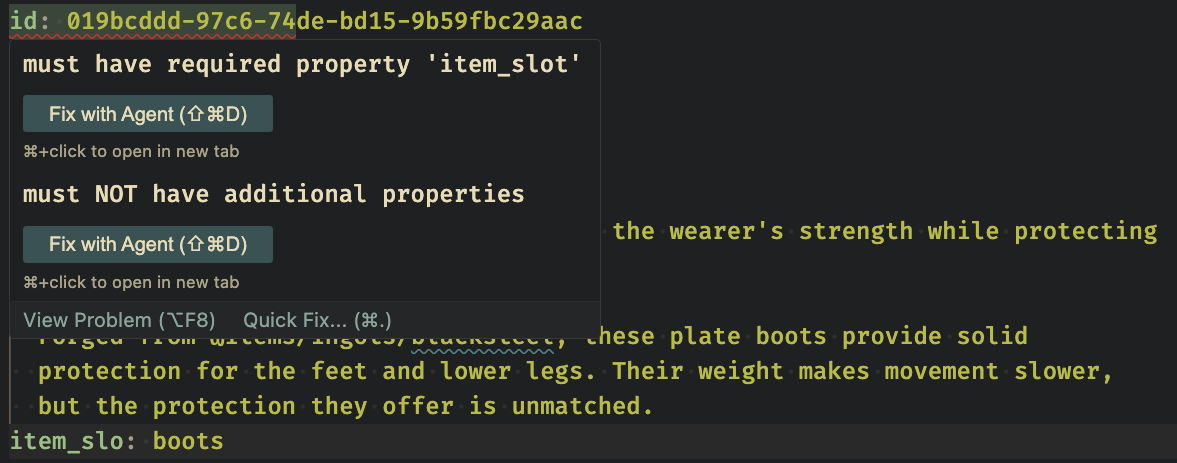
The linter verifies that every @reference points to a real entry.yml.
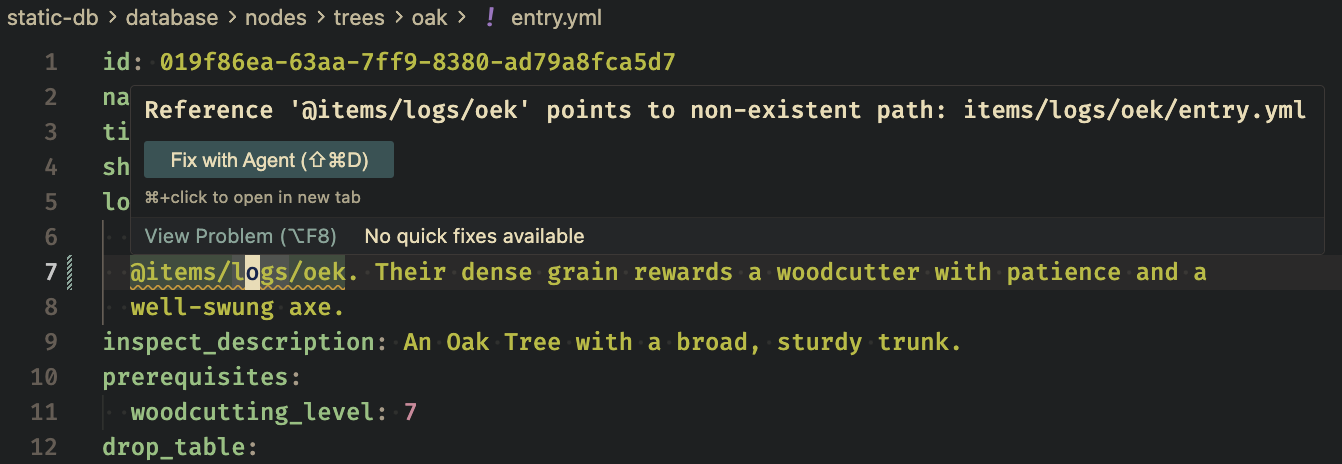
The linter also enforces formatting and line length. It runs on save in my editor and again in CI. I find mistakes there instead of waiting for something to break at runtime.
It feels a little strange to ship a public wiki before the game is available to anyone other than me.
The wiki reads the same YAML as the server and client, then renders a page for every item, skill, node, and station. Its purpose right now is selfish: it helps me keep things organized.
The game already has a few hundred entries, and that number keeps growing. When I'm working on combat and need to remember the stats on an Iron Sword, the level required to mine iron, or which recipes use  Bronze Ingot, I don't want to dig through YAML files. I keep the wiki open while I work. It's faster than grep, and a page with icons, stat tables, and cross-references is much easier to scan than a wall of YAML.
It's also been useful when working with artists. Instead of passing around spreadsheets of item names and tiers, I give them access to the wiki. They can browse the icons and descriptions, and see how the items relate to each other.
The wiki turns @ references into clickable links with icons and names. At build time it also scans the full database and computes reverse lookups for every entry:
- "Referenced By" lists entries that mention it in their description
- "Material For" lists crafting recipes that use it as an input
- "Item Sources" lists nodes that drop it and recipes that produce it
None of this is stored. When I add a smithing recipe that consumes Iron Ingot, the Iron Ingot page picks it up under "Material For" without another edit. Recipe pages show the same graph from the other side: materials in, produces out, with chance and quantity ranges on node drops.
Here is a  Wheat Sheaf, which both has item sources and is a material for other recipes:
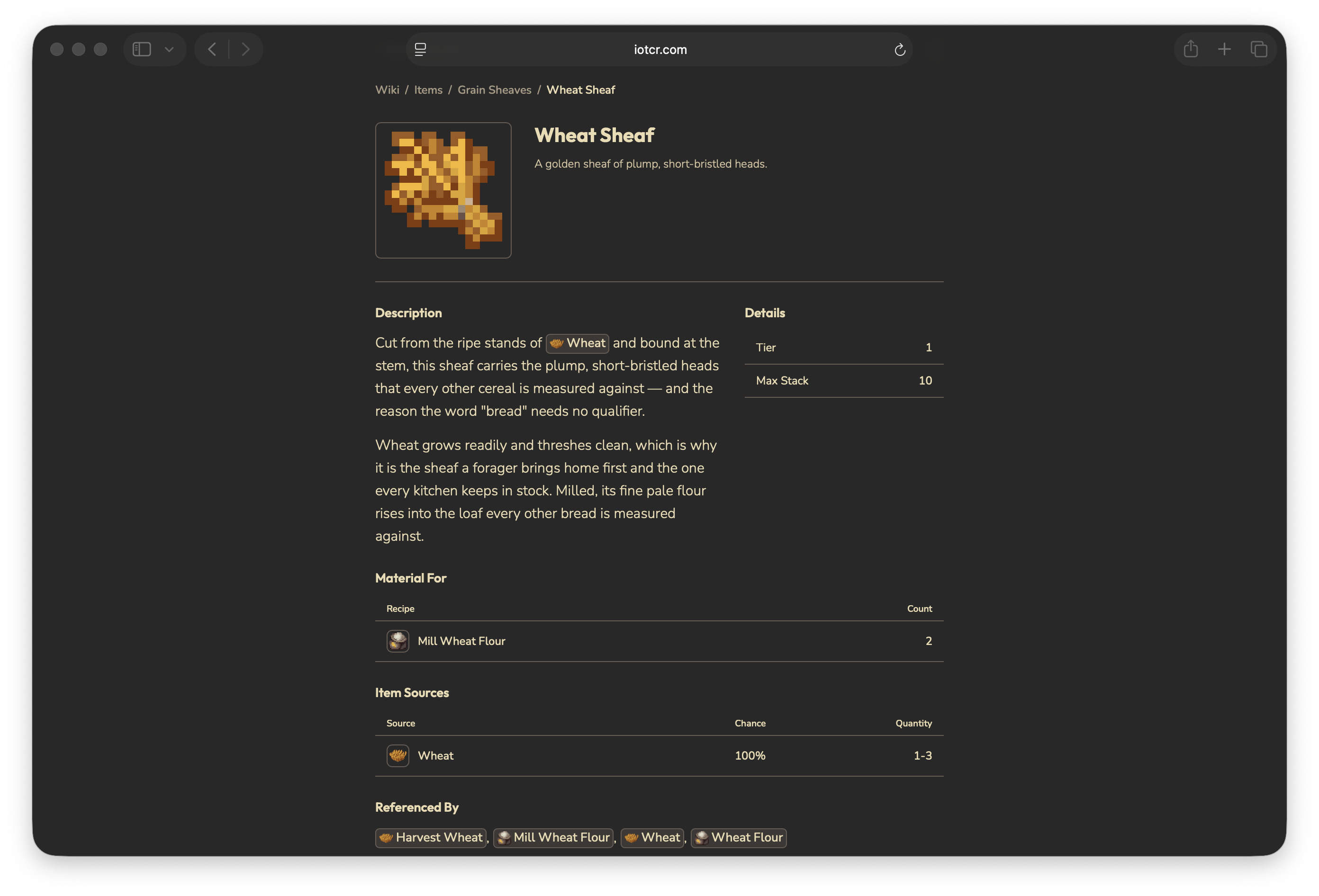
I don't have to keep the full crafting graph in my head.
The Iron Sword wiki URL is /wiki/items/equipment/weapons/swords/iron, which mirrors its static-db path: items/equipment/weapons/swords/iron/entry.yml. When the server syncs the item into PostgreSQL, it derives the slug from that same path: equipment/weapons/swords/iron.
It's the same path in four contexts:
| Context | Path |
|---|---|
| YAML reference | @items/equipment/weapons/swords/iron |
| Server item slug | equipment/weapons/swords/iron |
| Wiki URL | /wiki/items/equipment/weapons/swords/iron |
| Godot resource | resources/items/equipment/weapons/swords/iron.tres |
When the server needs to tell the client "you just received an Iron Sword," it sends the slug. The client uses it to look up the compiled resource for the icon and name. If I ever want to link to the wiki from the game, the URL is already there.
I chose the directory path so the same string is the database slug, the client resource lookup, the wiki URL, and the YAML reference. There is no mapping table between them.
Come say hi
Come chat with me. I'll share extra learnings in the Discord.
- The Discord just opened, so it's quiet and I'm excited to bounce ideas around with early members.
- You'll be the first to know about an early alpha.
- Technical folks are welcome, and so is anyone interested in playing the game.